Setting parameters
Introduction
This document describes the usage of a .par parameter (input) file for AGILE.
For a list of command line options, see Command line parameters.
Parameters are grouped in namelists according to their functionalities. The namelists have physics-independent class and physics-dependent class. The physics-independent class includes:
- Filelist Name and type of files to save (or read)
- Savelist When to save data
- Stoplist When to stop the simulation
- Methodlist Which numerical methods to use (e.g., flux scheme, time stepper, time integrator, limiter)
- Boundlist Boundary conditions
- meshlist Mesh-related settings (e.g. domain size, refinement)
- Paramlist Time-step parameters
The default parameter values in these namelists are set in
src/amrvacio/mod_input_output.t, look at the subroutine read_par_files for
details.
The physics-dependent namelists include:
- rho list (see also
mod_rho_phys) - nonlinear list (see also
mod_nonlinear_phys) - HD list (see also
mod_hd_phys) - MHD list (see also
mod_mhd_phys)
Further namelist are used to control optional modules. Most of these lists are not documented here, but the parameters are described in the corresponding modules:
rc_list(radiative cooling, seemod_radiative_cooling)tc_list(thermal conduction, seemod_thermal_conduction)dust_list(dust, seemod_dust)vc_list(viscosity, seemod_viscosity)grav_list(gravity, seemod_gravity)mf_list(magnetofriction, seemod_mf_phys)
An example for a namelist
The parameter file consists of a sequence of namelists, which look like this:
&listname
 var_a = value

 ! A comment
 var_b = value
 array = value1, value2, ...
 array(1,1) = value

 ! Repeat value 5 times in array
 array = 5*value
 ...
/
If you do not define a variable the default value is used.
The Fortran 90 standard for logical variable values is either T and F or
.true. and .false., but some compilers accept only one of them. Text between
namelists is ignored, but it may result in a run time error on some
machines/compilers.
The following namelist examples contain all the possible variables to set,
choices are indicated by |. The first choice is the default value. Only the
parameters different from default need to be set. Names that should be replaced
are in capital letters. The ... indicates optional extra elements for arrays,
or extra words in strings.
Physics-independent Namelists
Filelist
&filelist
  <variable definitions, see below>
/
| name | type | default | description |
|---|---|---|---|
| base_filename | string | 'data' | Base file name for simulation output, which will be followed by a 4-digit number |
| restart_from_file | string | - | Resume from the snapshot data with this file name. |
| typefilelog | string | 'default' | Use 'regression_test' to do regression test and use the value 'special' to enable user-defined log output |
| snapshotnext | integer | 0 | Start index for writing snapshots |
| slicenext | integer | 0 | Start index for writing slices |
| firstprocess | logical | F | If true, call initonegrid_usr upon restarting |
| reset_grid | logical | F | If true, rebuild the AMR grid upon restarting |
| convert | logical | F | If true and filenameini and snapshotini are given, convert snapshots to other file formats |
| convert_type | string | vtuBCCmpi | Which format to use when converting, options are: tecplot, tecplotCC, vtu, vtuCC, vtuB, vtuBCC, tecplotmpi, tecplotCCmpi, vtuBmpi, vtuBCCmpi, vtumpi, vtuCCmpi, pvtumpi, pvtuCCmpi, tecline, teclinempi, onegrid, EIvtiCCmpi, ESvtiCCmpi, SIvtiCCmpi, EIvtuCCmpi, ESvtuCCmpi, SIvtuCCmpi |
| slice_type | string | vtu | Which format to use when slicing, options are: csv, dat, vtu, vtuCC |
| collapse_type | string | vti | Which format to use when slicing, options are: csv, vti |
| autoconvert | logical | F | If true, already convert to output format during the run |
| sliceascii | logical | F | If true, enable ASCII output of Slice output |
| saveprim | logical | F | If true, convert from conservative to primitive variables in output |
| nwauxio | integer | 0 | Number of auxiliary variables that are only included in the output |
| w_convert_factor | double(1:nw) | 1.0 | Conversion factors for w variables |
| time_convert_factor | double | 1.0 | Conversion factor for time unit |
| length_convert_factor | double | 1.0 | Conversion factor for length unit |
level_io |
integer | - | When doing a convert, generate a uniform grid at this level |
level_io_min |
integer | 1 | Minimum grid level when doing a convert |
level_io_max |
integer | nlevelshi |
Maximum grid level when doing a convert |
| nocartesian | logical | F | If true, do not convert the output to a Cartesian coordinate system |
| w_write | logical(1:nw) | all true | VTK: Only write variables for which writew(iw) is true |
| writelevel | logical(1:nlevelshi) | all true | VTK: only write these levels |
| writespshift | double(1:ndim,1:2) | all zero | clip off this relative amount of the domain at the lower and upper side in each dimension |
The log file
By default, the logfile contains one line
with a string that is meant to identify the coordinate names, the conserved
variables (wnames) and other entries, and then follows a sequence of lines
containing numbers: i.e. a single line per requested output time, containing the
integer timestep counter it, the time global_time, the time step to be used in the
next time advance dt, the domain integrated value of each conserved variable
(nw real numbers, which allows to check perfect conservation across the grid
tree when the boundary conditions imply it), the percentage of the domain
covered by each allowed grid level (given by refine_max_level real numbers between 0.0 and 1.0,
with 1.0 indicating 100% coverage: when all numbers are summed, we get
1.0), and the number of grids per allowed grid level (hence, given by refine_max_level integers).
The logfile is by default saved as an ASCII file.
The order of saving snapshots, and regridding actions is fixed: regrid happens after the advance by one timestep,
then regrid, then save the data. This has consequences for the optional
variables beyond nwflux.
Further info on output and postprocessing
The code can be used to postprocess the AGILE .dat files (which are the
only ones to be used for restarts) to some convenient data files for later
visualisation purposes. Such conversion of a single .dat file at a time is to be
done with the same executable (or at least one compiled on a possibly different
machine), on a single processor (i.e. using mpirun
-np 1 amrvac). Only selected output types can be converted in parallel, namely
those whose name contains 'mpi' as part of the convert_type string. Currently,
this includes the ASCII (binary) versions of vtumpi (vtuBmpi) with values
located at cell corners and vtuCCmpi (vtuBCCmpi) with values at cell centers,
and similarly for tecplot (tecplotmpi or tecplotCCmpi). In addition,
pvtumpi (pvtuBmpi) and pvtuCCmpi (pvtuBCCmpi) result in parallel output
with one *.vtu file for each processor and a header file from master processor.
In this conversion mode, the idea is to set restart_from_file together
with convert=T. You can ask the code during
conversion to change from conservative to primitive variable output by setting
saveprim=T, and then the corresponding names for the primitive variables are
automatically determined. It is
also possible to perform the conversion step during run of the simulation with
the switch autoconvert=T. Naturally, this leads to more computational
overhead and IO, but using the pvtuB(CC)mpi filetype, this can be reduced to
a minimum.
For simulations on non-cartesian grids (cylindrical or spherical), there is
the option to output the non-cartesian cell coordinates and vector components,
which then forces you typically to do the conversion to cell center cartesian
grid coordinates and vector variables in your visualization session. By
default (i.e. nocartesian=F), the convert module does the conversion from
the orthogonal to locally cartesian coordinates and vector components for you.
You can overrule this default behavior by setting nocartesian=T. (note:
for tecplot format, the coordinate labels are then corrected in the converted
file as well).
The only variable that then further matters is convert_type.
For type 'tecplot', a corresponding base_filenamexxxx.plt file will be
generated, which is an ASCII file that stores the cell corner locations and
corner values for the conserved variables, to be handled with Tecplot. The
'onegrid' conversion type is just useful in 1D AMR runs, to generate a
single block file (extension '.blk'). Also particular to 1D data, and for
TecPlot purposes alone, is the 'tecline' option. This can also be done in
parallel mode, where it is called 'teclinempi'.
For visualization using Paraview, the option to convert to
convert_type='vtu' can be used. For both vtu and tecplot formats, there
are also corresponding vtuCC and tecplotCC options, which store the data
with the actually computed cell-centered values. For the vtu and tecplot
formats on the other hand, the code tries to already do some interpolation from
cell center to cell corner variables for you, but this may introduce some
artificial effects in non-cartesian geometries. The vtuB and vtuBCC do the
same as vtu(CC) but save the data in binary format.
It is even possible to temporarily add additionally computed auxiliary
variables that are instantaneously computable from the data in the
base_filenamexxxx.dat file to the converted snapshot. You should then
provide the number of such extra variables in nwauxio (see also
this page), and a corresponding
definition for how to compute them from the available nw variables in the associated
subroutine usr_special_convert whose default interface is provided in the
mod_usr_methods.t module. You can there compute variables that are not
in your simulation or data file, and store them in the extra slots
nw+1:nw+nwauxio of the w variable. For consistency, you should also then
add meaningfull names to a string to identify the auxiliary variables,
this has to be done in the associated subroutine usr_add_aux_names.
The output values are normally given in code units, i.e. in the dimensionless
values used throughout the computation (in the initial condition, we always
adhere to the good practice of choosing an appropriate unit of length, time,
mass and expressing everything in dimensionless fashion). One can, in the
convert stage only, ask to multiply the values by their respective dimensional
unit value. time_convert_factor should then be the unit for time, while the array
w_convert_factor for w variables and length_convert_factor for length.
The corresponding values for conservative entries are computed in convert.t when
saveprim=F. See for details of their use the convert.t module.
Note that different formats for postprocess data conversion can be added in
the convert.t subroutine. See convert for details.
The VTK-based formats allow for saving only a part of the nw variables, by
setting the logical array w_write. The same is true for selecting levels by
using the array writelevel. Finally, you can clip away part of the domain,
for output in a selected region. This is done by filling the array
writespshift. That array should use (consistent) double precision values
(between 0 and 1) that specify the percentage of the total domain to be
clipped away from the domain boundary at the minimum side, and from the
maximum side, respectively, and this for all dimensions. The array has thus a
dimensionality (1:ndim,1:2), with the first entry specifying the dimension,
and the second whether you clip for minimum (1) and maximum (2) sides,
respectively. Note that in the end, only the grids that are fully contained
within the clipped region are then converted and stored in the output.
The switches level_io, level_io_min and level_io_max are there to
restrict the AMR levels of the output file at the convert stage. These
switches do not work with autoconvert. E.g. setting level_io=3 will
coarsen/refine the data to level 3 everywhere, resulting in a uniform grid.
level_io_min limits the minimum level for output by refining levels below
level_io_min until level_io_min is reached. Correspondingly, level_io_max
limits the maximum level of the output file. This can be useful to visualize
large datasets.
The convert types EIvtiCCmpi, ESvtiCCmpi, SIvtiCCmpi, EIvtuCCmpi,
ESvtuCCmpi and SIvtuCCmpi are added for synthesize EUV images, EUV spectra
and SXR images, where EI represents EUV image, ES represents EUV spectra and
SI represents SXR image. The corresponding parameters , e.g. line of sight direction,
for synthesizing emissions should be provided in the Synthetic EUV/SXR/whitelight emission when the
convert types are activited.
Savelist
Example:
&savelist
    itsave(1,1)=0
    itsave(1,2)=0
    dtsave_log=0.01d0
    dtsave_dat=0.1d0
    dtsave_slice=0.05d0
    dtsave_collapsed=0.05d0
/
| name | type | default | description |
|---|---|---|---|
ditsave_log |
integer | biginteger |
Repeatedly save information in a log file when ditsave_log time steps have passed |
dtsave_dat |
double | bigdouble |
Repeatedly save dat files when dtsave_dat simulation time has passed |
itsave(SAVEINDEX,FILEINDEX) |
integer | biginteger | Save on these time steps |
tsave(SAVEINDEX,FILEINDEX) |
double | bigdouble |
Save on these times |
nslices |
integer | 0 | Number of slices |
slicedir(INTEGER) |
integer | - | Slice direction, see Slice output |
slicecoord(INTEGER) |
double | - | Slice coordinate, see Slice output |
collapse(INTEGER) |
logical | F | See Looking at line-integrated quantities |
collapseLevel |
integer | 1 | See Looking at line-integrated quantities |
Here FILEINDEX has the following meaning:
| index | meaning |
|---|---|
| 1 | Log output |
| 2 | Normal output |
| 3 | Slice output, see Slice output |
| 4 | Collapsed output, see Looking at line-integrated quantities |
| 5 | Call user custom analysis subroutine, see Writing a custom analysis subroutine |
One may want to save snapshots
more frequently at the beginning of the simulation. E.g. tsave(1,2)=0.1
tsave(2,2)=0.25 tsave(3,2)=0.5 dtsave_dat=0.5 could be used to save snapshots
at times 0.1, 0.25, 0.5, 1, 1.5, ... etc.
If no save condition is given for a file you get a warning, but the final
output is always saved after the stop condition has been fulfilled. If
itsave(1,2)=0 is set, the initial state is saved before advancing.
Stoplist
&stoplist
    it_max =INTEGER
    time_max =DOUBLE
    wall_time_max =DOUBLE
    dtmin =DOUBLE
    it_init =INTEGER
    time_init =DOUBLE
    reset_time =F | T
    reset_it   =F | T
    final_dt_reduction=T | F
/
| name | type | default | description |
|---|---|---|---|
it_max |
integer | biginteger |
a run ends when the number of time steps reaches it |
time_max |
double | bigdouble |
a run ends when the physical time reaches it |
wall_time_max |
double | bigdouble |
a run ends when the wall time reaches it (in hours) |
dtmin |
double | bigdouble |
a run stops when time step falls smaller than it |
it_init |
integer | 0 | set the initial number of time steps when start a new run |
time_init |
double | 0 | set the initial time when start a new run |
reset_time |
logical | F | when restart from a previous run, reset the time to the initial one if it is T |
reset_it |
logical | F | when restart from a previous run, reset the number of time steps to the initial one if it is T |
final_dt_reduction |
logical | T | forces the last dt to comply with time_max limit |
You may use an upper limit it_max for the number of timesteps, and/or the
physical time time_max, and/or the wall time 'wall_time_max' to end a run.
The wall time means wall clock time recording real-world time.
Numerical or physical instabilities may produce huge changes or very small
time steps depending on the way dt is determined. These breakdowns can be
controlled by either setting a lower limit dtmin for the physical time
step, which is useful when dt is determined from the courantpar
parameter. If a run stops due to dt < dtmin, a warning message is
printed.
You have to specify at least one of time_max, it_max. AMRVAC stops execution
when any of the limits are exceeded. The initial time value time_init and integer
time step counter it_init values, which are zero by default, can be specified
here. However, when a restart is performed from a previous .dat file, the values
in that file will be used unless you reset them to their initial values by
setting reset_time=T. If you want only to reset the iteration count
without changing time, set reset_it=T.
Methodlist
&methodlist

time_stepper='twostep' | 'onestep' | 'threestep' | 'fourstep' | 'fivestep'
time_integrator= choices depends on time_stepper
flux_scheme=nlevelshi strings from: 'hll'|'hllc'|'hlld','hllcd'|'tvdlf'|'tvdmu'|'tvd'|'cd'|'fd'|'source'|'nul'
limiter= nlevelshi strings from: 'minmod' | 'woodward' | 'superbee' | 'vanleer' | 'albada' | 'ppm' | 'mcbeta' | 'koren' | 'cada' | 'cada3' | 'mp5' | 'schmid1' | 'schimid2' | 'venk' | 'weno3' | 'wenoyc3' | 'weno5' | 'weno5nm'| 'wenoz5' | 'wenoz5nm' | 'wenozp5' | 'wenozp5nm' | 'weno5cu6' | 'teno5ad' | 'weno7' | 'mpweno7'
gradient_limiter= nlevelshi strings from: 'minmod' | 'woodward' | 'superbee' | 'vanleer' | 'albada' | 'ppm' | 'mcbeta' | 'koren' | 'cada' | 'cada3'
loglimit= nw logicals, all false by default
flatsh = F | T
flatcd = F | T
mcbeta= DOUBLE

typeentropy= 'nul'|'powell'|'harten'|'ratio'|'yee'
entropycoef= DOUBLE, DOUBLE, DOUBLE, ....

typetvd= 'roe' | 'yee' | 'harten' | 'sweby'
typeaverage='default' | 'roe' | 'arithmetic'

typeboundspeed= 'Einfeldt' | 'cmaxmean' | 'cmaxleftright'
tvdlfeps = DOUBLE

flathllc= F | T
nxdiffusehllc = INTEGER

source_split_usr= F | T
typesourcesplit= 'sfs' | 'sf' | 'ssfss' | 'ssf'
dimsplit= F | T
typedimsplit= 'default' | 'xyyx'| 'xy'

typegrad = 'central' | 'limited'
typediv = 'central' | 'limited'
typecurl = 'central' | 'Gaussbased' | 'Stokesbased'
/
time_stepper, time_integrator, flux_scheme
The time_stepper variable determines the time integration procedure. The
default procedure is a second order predictor-corrector type 'twostep' scheme
(suitable for TVDLF, TVD-MUSCL schemes), and a simple 'onestep' algorithm for
the temporally second order TVD method, or the first order TVDLF1, TVDMU1,
TVD1 schemes. It is not possible to mix different step size methods across
the AMR grid levels. The temporally first order but spatially second order
TVD1 algorithm is best suited for steady state calculations as a 'onestep'
scheme. The TVDLF and TVD-MUSCL schemes can be forced to be first order, and
linear in the time step, which is good for getting a steady state, by setting
time_stepper='onestep'.
There is also a fourth order Runge-Kutta type method, when
time_stepper='fourstep'
and one sets
time_integrator='rk4'. It can be used with dimsplit=.true..
These higher order time integration methods can be
most useful in conjunction with higher order spatial discretizations.
See also discretization.
The array flux_scheme defines a scheme to calculate the flux at cell interfaces using the chosen
method (like hll based approximate Riemann solver) per activated grid level
(and on each level, all variables use the same discretization). In total,
nlevelshi methods must be specified, by default nlevelshi=20 and these are
then all set by flux_scheme=20*'tvdlf'. Different discretizations can be mixed
across the refine_max_level activated grid levels (but the same stepping scheme must
apply for all of the schemes).
Setting for a certain level the flux_scheme to 'nul' implies doing no advance at all, and 'source' merely adds sources. These latter two values must be used with care, obviously, and are only useful for testing source terms or to save computations when fluxes are known to be zero.
Limiter type
For the TVDLF and TVD-MUSCL methods different limiter functions can be defined
for the limited linear reconstructions from cell-center to cell-edge
variables, and for the TVD method, for the characteristic variables.
The default limiter is the most diffusive limiter=nlevelshi*'minmod'
limiter (minmod for all levels), but one can also use
limiter=nlevelshi*'woodward', or use different limiters per level.
The gradient_limiter is the selection of a limiter to be used in computing
gradients (or divergence of vector) when the typegrad=limited (or
typediv=limited) is selected. It is thus only used in the gradientS
(divvectorS) subroutines in geometry.t and has effect for the magnetohydrodynamics (MHD) modules.
When having a gravitational stratification, one might benefit from performing linear reconstruction on the primitive variables log10(rho) and/or log10(p). This can be done by setting the corresponding loglimit(iw)=T with iw the label of the corresponding component in the w array (for density, this is thus iw=1).
When using PPM as a limiter, minor differences can be obtained using the switches flatcd and flatsh. These are meant to minimize potential ripples around contact discontuinities (flatcd) or shocks (flatsh), but one should first try without these flattenings (default behavior). PPM is actually only used in a quadratic reconstruction from center to edge, requires the use of a larger stencil (nghostcells=3), and can be used either in the methods (by setting limiter) or in the gradientS/divvectorS routines (when typegrad or typediv is limited, and gradient_limiter is ppm) in geometry.t. If flatcd=T or flatsh=T to flattern oscillations at contact discontuinities or shocks, it needs 1 more ghost cell, e.g., nghostcells=4.
Typeentropy, entropycoef
For Riemann solver based methods, such as TVD and TVD-MUSCL (but not TVDLF),
an entropyfix may be applied to avoid unphysical solutions. The fix is applied
to the characteristic variables. The default entropy fix is 'nul', i.e. no entropy
fix. When an expansion shock is formed, the entropy fix should be applied to
the non-degenerate characteristic waves, i.e. waves that can form shocks
(sound waves, fast and slow magnetosonic waves). The most powerful entropy fix
is called 'powell'. In practice, one may apply an entropy fix to all
characteristic waves, usually the slight extra diffusion makes the schemes
more robust. For Yee entropyfix the minimum characteristic speed (normalized
by dt/dx) can be set for each characteristic wave using the entropycoef
array.
Different TVD variants
Both tvd and tvdlf have a few variants, these can be set in the
strings typetvd and typeboundspeed, with defaults 'roe' and 'Einfeldt',
respectively. The default typetvd='roe' is the fastest of the four upwind
types. For the TVDLF, the 'cmaxmean' merely means whether the maximal physical
propagation speed is determined as the maximum speed for the mean state based
on averaging left centered and right centered states, or by taking the Roe
average eigenvalues for the left and right nonlinear waves proposed by Einfeldt
(Einfeldt 1988 J. Numer. Anal.). In the TVDLF flux, the diffuse
flux part has a coefficient tvdlfeps which is 1 by default. For steady-
state computations, one may gain in shock sharpness by reducing this factor to
a positive value smaller than 1.
Only for the adiabatic hydro module, the option to select an arithmetic, or
a roe average is available for use in the roe solver. This is set by the
typeaverage.
Just like in the TVDLF method, the slightly more involved HLL method has a
diffuse flux part with coefficient tvdlfeps which is 1 by default. For
steady-state computations, one may gain in shock sharpness by reducing this
factor to a positive value smaller than 1.
When using the HLLC scheme variants, for HD, MHD there is an
optional additional flattening in case the characteristic speed at the contact
is near zero. This is activated by setting flathllc=T (its default is
false). One can also solve some potential noise problems in the HLLC by
switching to the HLLCD variant, a kind of mix between HLLC and TVDLF. The
TVDLF is then used in a user-controlled region around a point where there is a
sign change in flux, whose width is set by nxdiffusehllc (an integer which
is 0 by default).
Dimensional splitting
Special sources, if any, can be added in a split or unsplit way according to the
logical variables source_split_usr The default value is false meaning these sources are added
in an unsplit way by default. The split sources are added according to
typesourcesplit. The meaning of the different options for
typesourcesplit is described in
discretization. Under default
settings, we use unsplit sources only, and if one reverts to split sources,
typesourcesplit='sfs'.
In multidimensional calculations dimensional splitting can be used by setting
dimsplit=T, with an alternating order of the sweeps
typedimsplit='xyyx' by default. It is best to use
dimsplit=F, the default value, but the TVD method needs a dimensionally
split strategy.
Positivity fixes
Negative pressure or density caused by the numerical approximations can make the
code crash. Upstream MPI-AMRVAC monitors and cures this through a generic
handle_small_values layer in &methodlist, controlled by small_density,
small_pressure, small_temperature, small_values_method,
small_values_daverage, check_small_values, fix_small_values,
trace_small_values and small_values_fix_iw.
None of those keys exist in AGILE. The generic layer was never wired up in
this fork — no physics module ever assigned phys_handle_small_values, so the
whole of mod_small_values and every one of the namelist keys above was inert,
and they have been removed. A par file that still sets any of them will now
fail to read, since a Fortran namelist read rejects an unrecognised key.
A floor is a physics-specific treatment and lives with its physics module
instead. At present only srhd has one: srhd_small_pressure and
srhd_small_density in &srhd_list (declared with the other srhd module
variables in src/srhd/mod_srhd_templates.fpp), both defaulting to zero. srhd_small_pressure is the lower bracket of the
pressure root-find in con2prim. The other physics modules have no floor; when
one of them needs it, the parameter belongs in that module's own namelist and
templates, not in &methodlist.
Special process
User controlled special process can be added to each iteration. Subroutine usr_process_grid can be registered in mod_usr.t to process for each grid. Subroutine usr_process_global can be registered in mod_usr.t to do global process. For example, you can do computations of non-local auxiliary variables (like the divergence of some vector fields, time integrals etc).
The typegrad can be selected to switch from simple centered differencing
on the cell center values, to limited reconstruction followed by differencing
when computing gradients. They call either of gradient ('central') or
gradientS ('limited') subroutines that are themselves found in the
geometry.t module. Similarly, a switch for the divergence of a vector is the
typediv switch. When the 'limited' variant is used, one must set the
corresponding gradient_limiter array to select a limiter (per level).
Boundlist
&boundlist
 nghostcells= INTEGER
 typeboundary_min^D= 'cont'|'symm'|'asymm'|'periodic'|'special'|'noinflow'
 typeboundary_max^D= 'cont'|'symm'|'asymm'|'periodic'|'special'|'noinflow'
 internalboundary = F | T
 ghost_copy= F | T
/
The boundary types have to be defined for each conserved variable, except for psi (in GLM-MHD) and tracer fluids, at each physical edge of the grid. For 2D hydrodynamics they are: rho,m1,m2,e at the left boundary (typeboundary_min1); rho,m1,m2,e at the right (typeboundary_max1); rho,m1,m2,e at the bottom (typeboundary_min2); rho,m1,m2,e at the top boundary (typeboundary_max2). Boundary types of psi (in GLM-MHD) and tracer fluids are automatically set to be the same as boundary type of density by default. Boundary types of dust density and dust momentum still must be set manually by user, if dust module is activated. The general subroutine devoted to the treatment of boundary conditions (either customized by the user or not, internal or external to the simulation space, polar or not) is get_bc and the main files concerned are mod_ghostcells_update.t and boundary_conditions.t. Since the pre-defined boundary conditions are applied to the conserved variables, it does not guarantee the continuity of the fluxes (i.e. the terms associated to the velocity within the divergences in the fundamental equations under their conservative form, see equations.md) and can prevent the fluid from reaching a steady state. For instance, a conserved total specific intern energy (i.e. intern plus kinetic energy) e does not result, in general, in a conserved flux of the variable carried by the velocity field i.e. e+P, where P is the pressure. Without a source term, it means that the time variation of e can not cancel out.
Instead of manually specifying one by one the boundary conditions, the user can write 8*'X' to replace 'X' 8 times in a row for instance. Beware, it is simply a syntax substitution rule which does not tell anything about the number of variables nor the number of dimensions. To improve readability, users are invited to highlight this underlying structure in the instructions. For instance, in a two dimensional hydrodynamical simulation space (ndim=2) with the mass density, three components of the velocity field (ndir=3) and an energy equation, if the bottom boundary is a plane of symmetry, the upper boundary is opened and the lateral boundaries are periodic, we would write :
&boundlist
 typeboundary_min1= 5*'periodic'
 typeboundary_max1= 5*'periodic'
 typeboundary_min2= 'symm','symm','asymm','symm','symm'
 typeboundary_max2= 5*'cont'
/
The default number of ghost cell layers used to surround the grid (and in fact
each grid at each level and location) is set by default to nghostcells=2 and
automatically increased if larger stencil is needed for high-order reconstructions.
For example, when limiter=mp5 it takes 3, and limiter=ppm makes it 4.
The default boundary type is cont for all variables and edges, it means
that the gradient (of the conservative variables) is kept zero by copying the
variable values from the edge of the mesh into the ghost cells.
Other predefined types are the symm and asymm types, which are mostly
used for reflective boundaries, or at symmetry axes of the domain (the polar
or equatorial axis, e.g.). One then typically makes the momentum orthogonal to
the given boundary antisymmetric (asymm), the rest of the variables
symm. These boundary types can also be used to represent a perfectly
conducting wall (the orthogonal component of the magnetic field should be
antisymmetric, the transverse component symmetric) or the physical symmetry of
the physical problem. More generally, true (a.k.a. polar) vectors (resp.
pseudovectors, a.k.a. axial vectors) such as the ones associated to a velocity
(resp. magnetic) field, transform such as the normal component (resp. the
tangential components) is antisymmetric while the tangential components (resp.
the normal component) are symmetric with respect to a plane of symmetry of
causes (distribution of mass, of currents, of charges, etc). And vice versa for
a plane of antisymmetry.
If the pole is adjacent to the simulation space (i.e. if the simulation extends down to a distance to the axis of 0 in cylindrical coordinates and if the simulation extends down to a colatitude of 0 or up to a colatitude of pi in spherical coordinates), symm and/or asymm boundary conditions must necessarily be specified. Scalar quantities are always symmetric. For a vector, whatever its nature (true vector or pseudovector), the boundary condition to choose for a given component depends on the behaviour of the axis vector associated to this component when a rotation of pi is performed within the plane orthogonal to the pole. In cylindrical coordinates, it means that the radial and vertical components should be symmetric while the orthoradial component is antisymmetric. In spherical coordinates, it means that the radial component is symmetric while the two remaining components are antisymmetric. For 3D cylindrical and spherical grid computations, the singular polar axis is trivially handled using a so-called pi-periodic boundary treatment, where periodicity across the pole comes from the grid cell diagonally across the pole, i.e. displaced over pi instead of 2 pi. These are automatically recognized from the coordinate setting, and the corresponding range in angle phi must span 2 pi for cylindrical, and theta must then start at zero (to include the north pole) and/or end at pi (for the south pole) for spherical grids. The user just needs to set the typeboundary as typeboundary_min2=8'pole' and/or typeboundary_max2=8'pole' in 3D spherical coordinates or typeboundary_min1=8*'pole' in cylindrical/polar coordinates, or use symmetry boundary (using symm and asymm combinations).
The case of periodic boundaries can be handled with setting 'periodic' for all variables at both boundaries that make up a periodic pair. Hence triple periodic in 3D MHD where 8 variables are at play means setting
typeboundary_min1=8*'periodic'
typeboundary_max1=8*'periodic'
typeboundary_min2=8*'periodic'
typeboundary_max2=8*'periodic'
typeboundary_min3=8*'periodic'
typeboundary_max3=8*'periodic'
The possibility exists to put a boundary condition mimicking zero across the computational boundary, by selecting typeboundary='noinflow' for the momentum vector components of your particular application. This is in principle only relevant for the momentum component locally perpendicular to the boundary (for others a continuous extrapolation is done). The noinflow extrapolates values that are outwardly moving continuously, while clipping all values that are inwardly advecting momentum to zero.
The special type is to be used for setting fixed values, or any time
dependent or other more complicated boundary conditions, and results in a call
to the usr_special_bc subroutine which has to be provided by the user in
the mod_usr.t module. The variables with
special boundary type are updated last within a given boundary region,
thus the subroutine may use the updated values of the other variables. The
order of the variables is fixed by the equation module chosen, i.e. rho m1 m2
m3 e b1 b2 b3 for 3D MHD. It is suggested to set all typeboundary entries
for a certain boundary region to special to consistently fill the
boundary info for all variables in a user-defined manner.
Internal boundaries can be used to overwrite the domain variables with
specified values through usr_internal_bc subroutine. This is activated with the switch internalboundary=T.
Internally, these are assigned before the ghost-cells and external boundaries
are applied (in subroutine get_bc).
The ghost_copy=F implies the use of limited linear
reconstructions in the filling of ghost cells for internal boundaries that
exist due to the AMR hierarchy. If ghost_copy=T, a first order 'copy' is
used 'unlimit'. To retain second order accuracy, the default set is needed.
meshlist
&meshlist
 geometry= 'Cartesian' | 'spherical' | 'cylindrical' | 'logSpherical' | 'logCylindrical'
 log_r0= DOUBLE
 refine_max_level= INTEGER
 domain_nx1= INTEGER
 domain_nx2= INTEGER
 domain_nx3= INTEGER
 block_nx1= INTEGER
 block_nx2= INTEGER
 block_nx3= INTEGER
 xprobmin1= DOUBLE
 xprobmax1= DOUBLE
 xprobmin2= DOUBLE
 xprobmax2= DOUBLE
 xprobmin3= DOUBLE
 xprobmax3= DOUBLE
 refine_criterion= INTEGER
 refine_usr= F | T
 nbufferx1= INTEGER
 nbufferx2= INTEGER
 nbufferx3= INTEGER
 max_blocks= INTEGER
 amr_wavefilter= nlevelshi DOUBLE values
 refine_threshold= nlevelshi DOUBLE values
 derefine_ratio= nlevelshi DOUBLE values
 w_refine_weight= DOUBLE array nw+1 values that must sum up to 1.0d0
 logflag= nw logical values, all F by default
 iprob= INTEGER
 prolongprimitive= F | T
 coarsenprimitive= F | T
 typeprolonglimit= 'default' | 'unlimit' | 'minmod' | 'woodward' | 'koren'
 tfixgrid= DOUBLE
 itfixgrid= INTEGER
 ditregrid= INTEGER
/
geometry
geometry selects the coordinate system: 'Cartesian' (the default),
'spherical' (r, theta, phi), 'cylindrical' (r, z, phi), or the
logarithmic-radius variants 'logSpherical'/'logCylindrical' (a radial mesh
uniform in ln(r + log_r0) rather than in r). This is a compile-time
choice -- changing it and re-running make regenerates the build's
config.mk and recompiles the finite-volume kernels for the new geometry,
rather than switching at runtime. Curvilinear support covers the hd, mhd,
srhd and ffhd physics modules, including the polar/cylindrical axis. See
Coordinate systems for the axis conventions, the
geometric source terms each non-Cartesian choice adds, the logarithmic radius,
and the current limitations.
log_r0
log_r0 (default 0.0) is the offset r0 in the logSpherical/logCylindrical
radial map ln(r + r0); it is a runtime parameter, not a compile-time one.
With log_r0 = 0 the map is the plain ln(r) and the domain cannot reach
r = 0 (xprobmin1 <= 0 is rejected). A positive log_r0 makes the mesh
uniform for r << r0 and lets a stretched radial grid touch the axis. Ignored
for the non-log geometries. See Logarithmically stretched
radius.
refine_max_level, max_blocks, domain_nx^D, block_nx^D, xprobmin^D, xprobmax^D
refine_max_level indicates the maximum number of grid levels that can be used
during the simulation, including the base grid level. It is an integer value
which is maximally equal to the parameter nlevelshi and minimally equal to 1.
The parameter nlevelshi=20 by default, a value set in mod_global_parameters.t,
so that if more than 20 levels are to be used, one must change this value and
recompile. Note that when refine_max_level>1, it is possible that during
runtime, the highest grid level is temporarily lower than refine_max_level, and/or
that the coarsest grid is at a higher level than the base level. The number of
grid blocks in each processor has an upper limit defined by max_blocks which
is 4000 by default and can be set to higher numbers if too many blocks in a
processor are allocated.
The computational domain is set by specifying the minimal and maximal coordinate value per direction in the xprob^L settings. When cylindrical or spherical coordinates are selected, the angle ranges (for phi in the cylindrical case, and for both theta and phi in the spherical case) are to be given in 2 pi units -- see geometry above and Coordinate systems for more detail.
The base grid resolution (i.e. on the coarsest level 1) is best specified by providing domain_nx^D, the number of grid cells per dimension, to cover the full computational domain set by the xprobmin^D and xprobmax^D. The resolution of each grid block is set by block_nx^D which exclude ghost cells at each side. The domain_nx^D must thus be a integer multiple of block_nx^D. The number of blocks on level 1 in a dimension, which does not have any pole or periodic boundary, must be larger than 1 for a rectanuglar mesh with more than one level because of the limitation from ghost-cell exchange at physical boundaries.
refine_criterion, nbufferx^D, amr_wavefilter
The code offers various choices for the error estimator used in automatically detecting regions that need refinement.
When refine_criterion=1, all refinement will only be based on the user-
defined criteria to be coded up in subroutine specialrefine_grid.
When refine_criterion=3, the default value, errors are estimated using
current t_n values and their gradients following Lohner prescription. In
this scheme, the amr_wavefilter coefficient can be adjusted from its
default value 0.01d0. You can set different values for the wavefilter
coefficient per grid level. This error estimator is computationally efficient,
and has shown similar accuracy to the Richardson approach on a variety of test
problems. When refine_criterion=3, the original Lohner method is used.
A call to the user defined subroutine usr_refine_grid follows the error
estimator, making it possible to use this routine for augmented user-controlled
refinement, or even derefinement. This call is only compiled in and invoked
when refine_usr=T (default F); unlike most other usr_* hooks, which are
registered as procedure pointers in usr_init(), usr_refine_grid must be
defined directly as a subroutine in mod_usr (with the exact interface
forcedrefine_grid in src/amr/mod_errest.fpp calls it with), because
refine_usr also gates a compile-time REFINE_USR fypp define -- like
geometry above, this is a case where AGILE resolves a user hook at compile
time rather than through a runtime procedure pointer, since the call needs
to be inlined into GPU-offloaded code.
Depending on the error estimator used, it is needed or advisable to
additionally provide a buffer zone of a certain number of grid cells in width,
which will surround cells that are flagged for refinement by any other means.
It will thus trigger more finer grids. nbufferx^D=2 is usually sufficient.
It can never be greater than the block size. For Lohner scheme, the buffer
can actually be turned off completely by setting nbufferx^D=0 which is
default value.
w_refine_weight, logflag, refine_threshold, derefine_ratio
In all error estimators mentioned above (except the refine_criterion=1 case), the comparison or evaluation is done only with a user-selected (sub)set of the conserved variables. The nw variables (which may include auxiliary variables) can be used for error estimation, by setting corresponding weights in the array w_refine_weight, which by default has the first element (corresponds to density) as 1.d0 and rest elements as 0.d0. The weights w_refine_weight(:) must be positive values between 0.0d0 and 1.0d0, and must add to unity.
The Lohner error estimation (refine_criterion=3) may also decide to use differences in the log10(rho), and this is then done by setting the logflag(1)=T. This can be done per selected variables involved in the estimation, but obviously only works for those that remain positive throughout.
In the comparison involving the above selected variables, when the total error
exceeds the value set by refine_threshold, the grid is triggered for refining.
Reversely, if the error drops below derefine_ratio * refine_threshold, the
grid is coarsened. The user must always set a (problem dependent) value for
refine_threshold (below 1), while the default value for
derefine_ratio=1.0d0/8.0d0 has shown to be a rather
generally useful value. You can set threshold values that differ per
refinement level.
When subroutine usr_refine_threshold is registered, user can use it to modify refine_threshold depending on location of interest. For example, increase refine_threshold near quiet boundaries to use coarser blocks there or decrease it to use finer blocks in focused regions.
iprob
As a possible integer switch for selecting multiple problem setups in the same
executable code, the integer switch iprob is provided. It is meant to be
used only in the user-written subroutines, for switching between e.g. multiple
initial conditions for the same executable.
prolongprimitive, coarsenprimitive
It is possible to enforce the code to use primitive variables when coarsening
grid information (coarsen), or filling new finer level grids
(prolongation). They are then used instead of the conservative variables,
which may not be a wise choice, but is perhaps better behaved with respect to
positivity of pressure etc. This is activated seperately for prolongation by
prolongprimitive=T, and for coarsen by coarsenprimitive=T.
typeprolonglimit selects the slope limiter used when linearly
interpolating a coarse cell onto its finer children during prolongation
('unlimit', 'minmod', 'woodward' or 'koren'; default 'default').
Note: in this fork, the select case(typeprolonglimit) branch in
src/amr/mod_refine.fpp that would act on this choice is currently
commented out, so prolongation always falls through to its case default
(a minmod-like limiter) regardless of what typeprolonglimit is set to --
the parameter is parsed but has no effect yet.
The parameters tfixgrid, itfixgrid are available to fix the AMR
hierarchical grid from a certain time onwards (tfixgrid) or iteration (the it-
counter for the timesteps) onwards (itfixgrid). This may be handy for steady-
state computations, or for those cases where you know that the initial
conditions and physical setup is such that the AMR structure at t=0 will be
optimal for all times.The parameter ditregrid is introduced to reconstruct
the whole AMR grids once every ditregrid iteration(s) instead of regridding
once in every iteration by default.
Grid stretching
Upstream MPI-AMRVAC's general grid stretching (stretch_dim,
qstretch_baselevel, nstretchedblocks_baselevel, stretch_uncentered) is
not available in AGILE and those &meshlist keys are no longer read. AGILE
builds every cell metric analytically on the device from the block corner and a
constant spacing, which a within-block varying spacing cannot express.
The one supported non-uniform mesh is a logarithmically stretched radius,
selected through the coordinate system itself:
geometry = 'logSpherical' / 'logCylindrical' with the optional log_r0
offset (see geometry and
Logarithmically stretched radius).
It is exempt precisely because it is still a uniform mesh in the logical
coordinate xi = ln(r + log_r0).
Paramlist
¶mlist
dtpar= DOUBLE
courantpar= DOUBLE
typecourant= 'maxsum' | 'summax' | 'minimum'
dtdiffpar= DOUBLE
slowsteps= INTEGER
/
dtpar, courantpar, typecourant, dtdiffpar, dtTCpar, slowsteps
If dtpar is positive, it sets the timestep dt, otherwise
courantpar is used to limit the time step based on the Courant condition.
The default is dtpar=-1. and courantpar=0.8.
For resistive MHD, the time step is also limited by the diffusion time: dt
< dtdiffpar*dx^2/eta. The default is dtdiffpar=0.5. Further
restrictions on the time step can be put in the usr_get_dt subroutine in
the mod_usr.t. The library routines for
viscosity and div B diffusive cleaning, all use the coefficient dtdiffpar in
their stability conditions. The typecourant='maxsum' means that the
time step limit for the CFL conditions takes the maximum over a summed
contribution to the maximum physical propagation speed for all dimensions. The
detailed formulae are found in setdt.t.
If the slowsteps parameter is set to a positive integer value greater than
1, then in the first slowsteps-1 time steps dt is further reduced
according to the
dt= dt * [ 1 - (1-step/slowsteps)**2 ]
formula, where step=1..slowsteps-1. This reduction can help to avoid
problems resulting from numerically unfavourable initial conditions, e.g. very
sharp discontinuities. It is normally inactive with a default value -1.
Physics-dependent Namelists
rho list
&rho_list
  rho_v= ndim doubles for advection velocity
/
nonlinear list
&nonlinear_list
  nonlinear_flux_type= INTEGER
  kdv_source_term= F | T
/
HD list
&hd_list
  hd_energy= T | F
  hd_n_tracer= INTEGER
  hd_gamma= DOUBLE
  hd_adiab= DOUBLE
  hd_dust= F | T
  hd_thermal_conduction= F | T
  hd_radiative_cooling= F | T
  hd_gravity= F | T
  hd_viscosity= F | T
  hd_particles= F | T
  He_abundance= DOUBLE from 0 to 1
  SI_unit= F | T
/
MHD list
&mhd_list
 mhd_energy= T | F
 mhd_n_tracer= INTEGER
 mhd_gamma= DOUBLE
 mhd_adiab= DOUBLE
 mhd_eta= DOUBLE
 mhd_eta_hyper= DOUBLE
 mhd_etah= DOUBLE
 mhd_glm_alpha= 0.5d0 between 0 and 1
 mhd_glm_extended= T | F
 mhd_magnetofriction= F | T
 mhd_thermal_conduction= F | T
 mhd_radiative_cooling= F | T
 mhd_Hall= F | T
 mhd_gravity= F | T
 mhd_viscosity= F | T
 mhd_particles= F | T
 mhd_4th_order= F | T
 mhd_internal_e= F | T
 mhd_hydrodynamic_e= F | T
 mhd_semirelativistic= F | T
 mhd_boris_simplification= F | T
 mhd_reduced_c = 6.d8
 mhd_trac= F | T
 mhd_trac_type= INTEGER from 1 to 6
 mhd_trac_mask= bigdouble
 mhd_trac_finegrid= INTEGER
 typedivbfix= 'linde'|'ct'|'glm'|'powel'|'lindejanhunen'|'lindepowel'|'lindeglm'|'multigrid'|'none'
 type_ct='uct_contact'|'uct_hll'|'average'
 source_split_divb= F | T
 boundary_divbfix= 2*ndim logicals, all false by default
 divbdiff= 0.8d0 between 0 and 2
 typedivbdiff= 'all' | 'ind'
 clean_initial_divb= F | T
 divbwave= T | F
 B0field= F | T
 B0field_forcefree= T | F
 Bdip= DOUBLE
 Bquad= DOUBLE
 Boct= DOUBLE
 Busr= DOUBLE
 He_abundance= DOUBLE from 0 to 1
 SI_unit= F | T
/
Magnetic field divergence fixes
The upwind constrained transport methods typedivbfix='ct' by Gardiner and Stone in Journal of Computational Physics, 205, 509-539 (2005) type_ct='uct_contact' (default), or by Del Zanna, L., Zanotti, O., Bucciantini, N., & Londrillo, P. in Astronomy & Astrophysics , 473, 11 (2007) type_ct='uct_hll', using staggered grid for magnetic field, can preserve initial div B to round off errors. A simple non-upwinding version of ct is through averaging electric fields from neighbors type_ct='average'. And it only works with HLL, HLLC, and HLLD schemes in the current implementation. It works in Cartesian and non-Cartesian coordinates with or without grid stretching. It works with finite non-zero resistivity. Initial conditions and boundary conditions for magnetic field have to be given at corresponding cell faces instead, or vector potential is given at corresponding cell edges, see examples: tests/mhd/solar_atmosphere_2.5D. Note that when using AMR, the div B preserving prolongation for CT requires even number of ghost cell layers and odd number of ghost layers for some slope limiters, e.g. mp5, is added by one to become even.
In cell-center based magnetic fields, sources proportionate to the numerical monopole
errors can be added, in a source-split way, to momemtum, energy, and induction equation
(the 'powel' type), or to the induction equation alone (the 'janhunen' type) for cleaning divB errors.
The divbwave switch is effective for the Riemann type solvers for multi-D MHD only.
The default true value corresponds to Powell divergence wave which stabilizes the Riemann solver.
Another source term strategy for monopole error control is choose 'linde' type
to do parabolic cleaning, i.e. add source terms which diffuse the local error at the maximal
rate still compliant with the CFL limit on the time step. This is activated
when divbdiff is set to a positive number, which should be less than 2,
and again comes in various flavors depending on which equations receive source
terms. The choice where only the induction equation gets modified, i.e.
typedivbdiff='ind' can be used.
GLM-MHD mixed hyperbolic and parabolic dampening of the divB error using an
additional scalar variable Psi. The algorithm of 'glm' is described by
Dedner et al. as Equation (24) in
Journal of Computational Physics 175, 645-673 (2002) doi:10.1006/jcph.2001.6961.
The default one with parameter mhd_glm_extended=.true. is the extended GLM-MHD with
divb related sources terms in momemtum and energy equation. The GLM-MHD method without the
sources terms is used when mhd_glm_extended=.false.. The parameter mhd_glm_alpha ranging
from 0 to 1.0 is the ratio of the diffusive to advective time scales for divb cleaning.
You can choose 'lindejanhunen', 'lindepowel', or 'lindeglm' to use combined divb cleaning.
Projection scheme using multigrid Poisson solver by Teunissen and Keppens in
Computer Physics Communications 245, 1068, (2019) can be chosen as 'multigrid' to
remove div B part of B. If clean_initial_divb is set to T, the projection scheme is
used to remove div B once after initial condition in unstretched Cartesian CT-MHD cases.
Magnetic field splitting strategy
For MHD, we implemented the possibility to use a splitting strategy following
Tanaka, where a time-invariant background magnetic field is handled
exactly, so that one solves for perturbed magnetic field components instead.
This method works with HLLD, HLL and TVDLF flux and with all divb cleaning methods.
The magnetic field splitting is activated by B0field=T, and the magnitude of
the background magnetic field can be controlled using the parameters
Bdip, Bquad, Boct, Busr. The first
three are pre-implemented formulae for a dipole, quadrupole and octupole field
in spherical coordinates only (the parameters set the strength of the dipole,
quadrupole and octupole field). This is coded up in the module set_B0.t.
This same module calls in addition the usr_set_B0 subroutine when
Busr is non-zero, where it then should be used to quantify an additional
time-independent field. This latter can be used for cartesian or
cylindrical coordinates as well. User can possibly prescibe analytic current in
usr_set_J0 subroutine to significantly increase accuracy. Choose
B0field_forcefree=T when your background magnetic field is forcefree for better
efficiency and accuracy.
The transition region adaptive conduction (TRAC) method
For solar atmosphere, simulations can sometimes suffer from the huge temperature gradient in the transition region. If the resolution is not enough (typically 1 km), the upward evaporation might be underestimated. The TRAC method could be used to correct the evaporation through artificially broadening the transition region. Set 'mhd_trac=T' to enable this function. 'mhd_trac_type=1' is the basic TRAC method for 1D simulation (see Johnston et al. 2019, 2020). When it is used for 2D or 3D simulations, the local cutoff temperature inside each block would be calculated separately. It is the fastest way in multi-D simulations, it is not accurate but basically, is physically correct. For multi-D uniform Cartesian grids, we prepared some other methods. 'mhd_trac_type=3' is the multi-D TRAC method based on the field line tracing module. For multi-D simulations, it should be the most accurate one, but might be very slow. Considering that this TRAC modificaiton will mostly affect the transition region, one can use 'mhd_trac_type=5' to add a mask to limit the region where the field lines are integrated. Give 'mhd_trac_mask' to set the maximum height of the mask, in your unit_length. 'mhd_trac_type=4' uses the block-based TRAC method for multi-D simulations, which should be faster than the second type. And 'mhd_trac_type=6' works in a similar way with the 4th type, by adding a mask on the block-based TRAC method. Give 'mhd_trac_finegrid' to set the distance between two adjacent traced field lines (in the unit of finest cell size). Note that when setting 'mhd_trac_type >=3', the direction of your gravity should follow y-dir (2D) or z-dir(3D).
'mhd_trac_type=2' is anthor TRAC method, which broadens the transition region according to a different criterion. Unlike Johnston TRAC method, this TRAC method has the advantage that all the calculation is done locally within the block. Thus, it could be used in either 1D (M)HD or multi-D MHD simulations, and is much faster than other multi-D methods.
Solve internal or hydrodynamic energy to avoid negative pressure
In extremely low beta plasma, internal energy or gas pressure easily goes to
negative values when solving total energy equation, because numerical error of magnetic
energy is comparable to the internal energy due to its extremely small fraction in the
total energy. We have two methods to avoid this problem. In the first method, we solve
internal energy equation instead of total energy equation by setting mhd_internal_e=T.
This function is compatible with all finite volume and finite difference schemes we have, including
HLL, HLLC, and HLLD, in which the Riemann flux of the internal energy is evaluted
as the HLL flux in all intermediate states of the Riemann fan.
In the second method, We solve hydrodynamic energy, i.e., internal and kinetic energy, instead of
total energy with an additional source term of Lorentz force work, by setting mhd_hydrodynamic_e=T,
which has better conservation than solving internal energy.
Solve semirelativistic MHD to tackle extreme Alfven speed
The Alfven speed in nonrelativistic MHD, defined as B/sqrt(mu rho), can be extremely large, even unphysically larger than speed of light in strong magnetic field and low density regions. Semirelativistic MHD equations (Gombosi et al. 2002 JCP 177, 176) as the nonrelativistic hydrodynamic limit of the relativistic MHD equations solve the problem and have the same steady-state solution as nonrelativistic MHD. By artificially lowering the speed of light, one can reduce the wave speeds allowing larger time steps thus faster solution in explicit numerical schemes. Set 'mhd_semirelativistic=T' and 'mhd_reduced_c' equals to a value smaller than light speed with physical unit to solve semirelativistic MHD. If setting 'mhd_hydrodynamic_e=T' or 'mhd_internal_e=T', the approximate split semirelativistic MHD equations (Rempel 2017 ApJ 834, 10) are solved with hydrodynamic or internal energy instead of total energy. Boris simplification of semirelativistic MHD equations can be solved by setting 'mhd_boris_simplification=T' and 'mhd_semirelativistic=F' to get faster but less accurate solutions. 'mhd_boris_simplification=T' is working with all versions of MHD equations including 'mhd_internal_e=T' and 'mhd_hydrodynamic_e=T'. Since semirelativistic MHD waves are very complicated, only approximate fast magnetosonic wave speed is implemented to use HLL or tvdlf scheme, schemes (such as HLLC and HLLD) depending on more wave speeds are not yet fully compatible with semirelativistic MHD. Note that when using semirelativistic MHD, the definitions of momentum and total energy are different from MHD, so call 'mhd_to_primitive' to get velocity and gas pressure from momentum and total energy instead of using the classic relations.
Synthetic EUV/SXR/whitelight emission
User can synthesize EUV images, EUV spectra, SXR images and whitelight images using 3D .dat files inside amrvac. These can be finished easily by adding some parameters into .par file. The images/spectra will be output to .vtu/.vti files when the convert_type in Filelist is set to 'EIvtiCCmpi', 'ESvtiCCmpi', 'SIvtiCCmpi' ... Thehe size of a pixel is the same as that in relevant observation data (such as SDO and RHESSI). The point spread function (PSF, instrument effect) has been included for 'instrument' resolution.
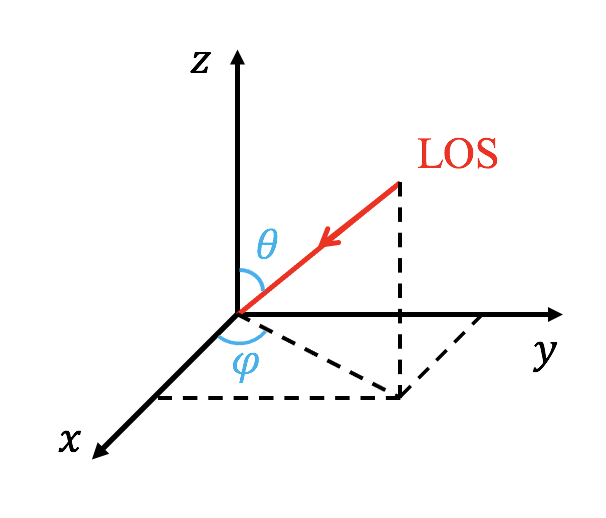
The line of sight (LOS) is controlled with 'LOS_theta' and 'LOS_phi', where the LOS is anti-parallel to the vector [cos(LOS_phi)sin(LOS_theta), sin(LOS_phi)sin(LOS_theta),cos(LOS_theta)] (see the following figure). The units of 'LOS_theta' and 'LOS_phi' are degree. User can rotate the image with 'image_rotate' (in degree). In cartesian coordinate, the y direction of the image is located in a plane given by the LOS and the z direction of the simulation data. In spherical coordinate, the definations of 'LOS_theta' and 'LOS_phi' are the same with theta and phi of the coodinate, but 'LOS_theta' and 'LOS_phi' are in degree.
The whitelight emission supposed observed by LASCO can be synthesized, and the instrument related parameter refers to 'whitelight_instrument'. User can specify the radius of the occultor of the instrument with 'R_occultor' (in solar radius).
The wavelength of an EUV image is defined with 'wavelength'. The bottom/upper cutoff energy of SXR image is defined with 'emin_sxr'/'emax_sxr' (in keV).
The wavelength of the EUV spectra is defined with 'spectrum_wl'. When 'spectrum_euv' is 'true', spectra at a slit in the corresponding image will be given. The output is a 2D image, where x-axis is wavelength and y-axis is space (physics distance at the slit). The slit is parallel to the y axis of corresponding EUV image (controlled by 'LOS_theta', 'LOS_phi' and 'image_rotate'). The location of the slit 'location_slit' is the x value of the image. The location of the slit 'location_slit' is the coordinate value at the third direction (perpendicular to LOS and slit). For example, the LOS along x direction and the slit along y direction, then 'location_slit' should be z of the slit. The domain in wavelength is controlled by 'spectrum_window_min' and 'spectrum_window_max'.
In cartesian, the mapping between simulation box coordinate and synthesized image coordinate is not only controlled by LOS, but also controlled by the parameter 'x_origin'. The simulation box point given by 'x_origin' will always located at (X=0,Y=0) of the synthesized image. The parameter 'big_image' is added for making movie that the LOS is changing. When 'big_image=T', then the synthesized EUV/SXR image will have a fixed big domain. The domain will not change when changing the LOS, and the whole simulation box will always be convered inside the domain. The parameter 'x_origin' is also added for making such kind of movie.
Two types of resolution are supported: data resolution and instrument resolution. In data resolution, the size of the image pixel is the same as the size of the finest cell. In instrument resolution, the size of a pixel is the same as that in relevant observation data (such as SDO and RHESSI). The point spread function (PSF, instrument effect) has been included for instrument resolution. The spatial resolution or EUV image/SXR image/EUV spectra is controlled by the parameter 'dat_resolution'. The default resolution is instrument resolution, and the data resolution can be activated by setting 'dat_resolution' to 'True'. Under the instrument resolution, the spatial resolution can be artificially changed with the parameter 'instrument_resolution_factor'. For example, we can double the spatial resolution by setting 'instrument_resolution_factor=2'.
The default unit of length for the outputed image is arcsec and the related variables in .par file, but user can set 'activate_unit_arcsec' to F to use the simulation length unit.
Only Cartesian and spherical coordinate system are supported currently. In spherical coordinate, region below 'R_opt_thick' (in solar radius, default value is 1) is assumed as not transparent.
&emissionlist
  filename_euv= CHARACTER
  wavelength= 94 | 131 | 171 | 193 | 211 | 304 | 335 | 1354 | 263 | 264 | 192 | 255
  LOS_theta= DOUBLE
  LOS_phi= DOUBLE
  image_rotate= DOUBLE
  x_origin(1:3)= DOUBLE
  big_image= LOGICAL
  filename_sxr= CHARACTER
  emin_sxr= INTEGER
  emax_sxr= INTEGER
  filename_spectrum= CHARACTER
  spectrum_wl= 1354 | 263 | 264| 192 | 255
  spectrum_window_min= DOUBLE
  spectrum_window_max= DOUBLE
  location_slit= DOUBLE
  filename_whitelight= CHARACTER
  whitelight_instrument= 'LASCO/C1' | 'LASCO/C2' | 'LASCO/C3'
  R_occultor= DOUBLE
  R_opt_thick= DOUBLE
  activate_unit_arcsec= LOGICAL
  dat_resolution=LOGICAL
  instrument_resolution_factor=INTEGER
/
Splitting of the hydrostatic equilibrium
set
        has_equi_pe0 = .true.
        has_equi_rho0 = .true.
to true in mhd_list and implement usr_set_equi_vars in mod_ust.t file
  subroutine usr_init()

  ...

    usr_set_equi_vars => special_set_equi_vars

  ...
  end subroutine usr_init


  subroutine special_set_equi_vars(ixI^L,ixO^L,x,w0)
    use mod_global_parameters
    integer, intent(in)             :: ixI^L,ixO^L
    double precision, intent(in)    :: x(ixI^S,1:ndim)
    double precision, intent(inout) :: w0(ixI^S,1:number_equi_vars)


    w0(ixO^S,equi_pe0_) = ...
    w0(ixO^S,equi_rho0_) = ...

  end subroutine special_set_equi_vars